
XJTAG 4.3 introduces a ‘Select XJLinks’ dialog in XJRunner, so you can now pick exactly which XJLinks or FTDI devices you want to see.
If the XJPack (.xjp) file opened in XJRunner contains an FTDI pin mapping, a new “Select XJLinks or FTDI Devices” dialog now appears automatically before testing begins. Every detected XJLink and FTDI device is listed and checked by default, so you simply uncheck any devices you don’t want XJRunner to display – an FTDI adaptor left plugged in from another job, for instance.
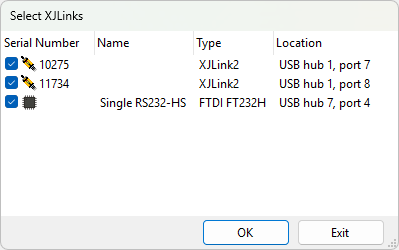
FTDI devices don’t always announce themselves clearly, and it’s easy to end up with more of them enumerated on a test PC than you actually want XJRunner to use. This update means you can leave everything connected and tell XJRunner which devices to display.
In addition to the automatic prompt with an FTDI pinmapping, a “Select XJLinks” entry now also sits on the Tools menu. Use this to view the Select XJLinks dialog without having to reload the project.
Leave A Comment