
XJTAG 4.2 adds support for the XJLink-PF20, a new 4-TAP JTAG controller. The XJLink-PF20 has two 20-way connectors, each with its own voltage domain.
Like its larger sibling XJLink-PF40, the XJLink-PF20 JTAG connectors use the SignalIntegrity10 interface.
XJDeveloper projects can contain pin mappings for any or all of XJLink-PF40, XJLink-PF20 and XJLink2-series devices. A pin mapping for the XJLink-PF20 can be added to the project on the Pin Mapping screen, XJDeveloper will try to use any existing pin mapping in the project to automatically populate the new pin mapping:
- If there is an existing XJLink-PF40 pin mapping in the project, the bank settings and pins that were defined on connectors A and B of the XJLink-PF40 will be copied directly onto connectors A and B of the XJLink-PF20.
- If there is only an XJLink2 pin mapping in the project, you can configure which bank of the XJLink2 should have its setting and pins copied on to connector A, and which should be copied onto connector B.
Connections defined to the XJLink-PF20 will be shown as from “XJLINK.A” if they are on connector A, or “XJLINK.B” if they are on connector B. These connections are shared across the XJLink-PF20 and the XJLink-PF40, so it is not possible to define different connections for the different types of XJLink even if the project contains both types of pin mappings.
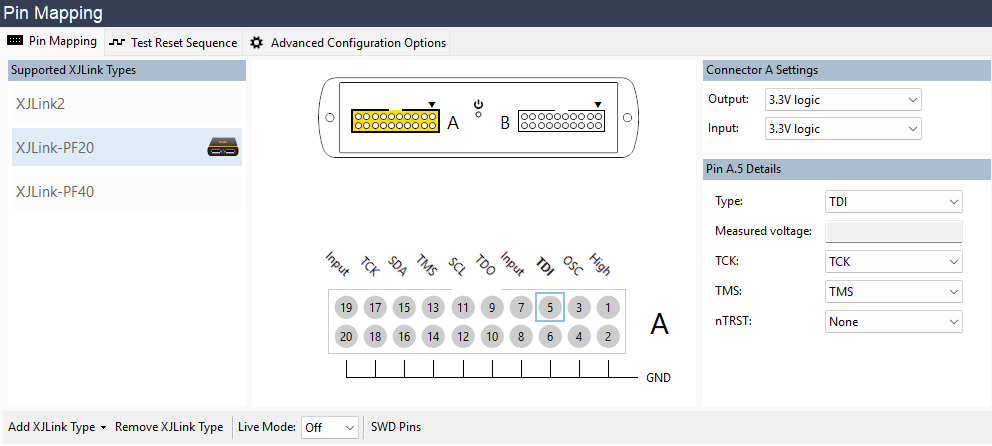
XJLink-PF20 pin mapping setup
Leave A Comment